Stop guessing which products are working.
Start knowing.

StockPropel segments every product in your catalogue into five performance tiers: Top Performers, Revenue Drivers, Volume Drivers, Slow Movers, and Dead Stock — automatically, on every sync.

You're on the list — we'll be in touch the moment we launch.

Launching soon on the Shopify App Store

Every variant. Five performance tiers. One clear picture.

StockPropel connects to your Shopify store and automatically segments your entire catalogue into five performance tiers — giving you a portfolio view that didn't exist before.

Top Performers

High Revenue · High Volume

The variants carrying your catalogue. Strong velocity and strong revenue — your commercial foundation.

Revenue Drivers

High Revenue · Low Volume

High AOV, lower frequency. Strong candidates for paid ads given the margin available.

Volume Drivers

Low Revenue · High Volume

High frequency, lower revenue per unit. Strong sell-through rate but limited margin contribution relative to volume.

Slow Movers

Low Revenue · Low Volume

Working capital is tied up here. Low velocity and weak revenue contribution — demand or visibility diagnosis needed.

Dead Stock

Zero Movement

No sales in the analysis window. Stock is consuming working capital with zero return. Immediate attention required.

Find out exactly where your catalogue stands — in minutes, for free.

Most merchants have a rough sense of what's selling and what isn't. The Overview gives you the complete picture — total portfolio value, how your capital is distributed across all five performance tiers, and where your exposure sits. No spreadsheets. Just a clear view of where your catalogue stands.
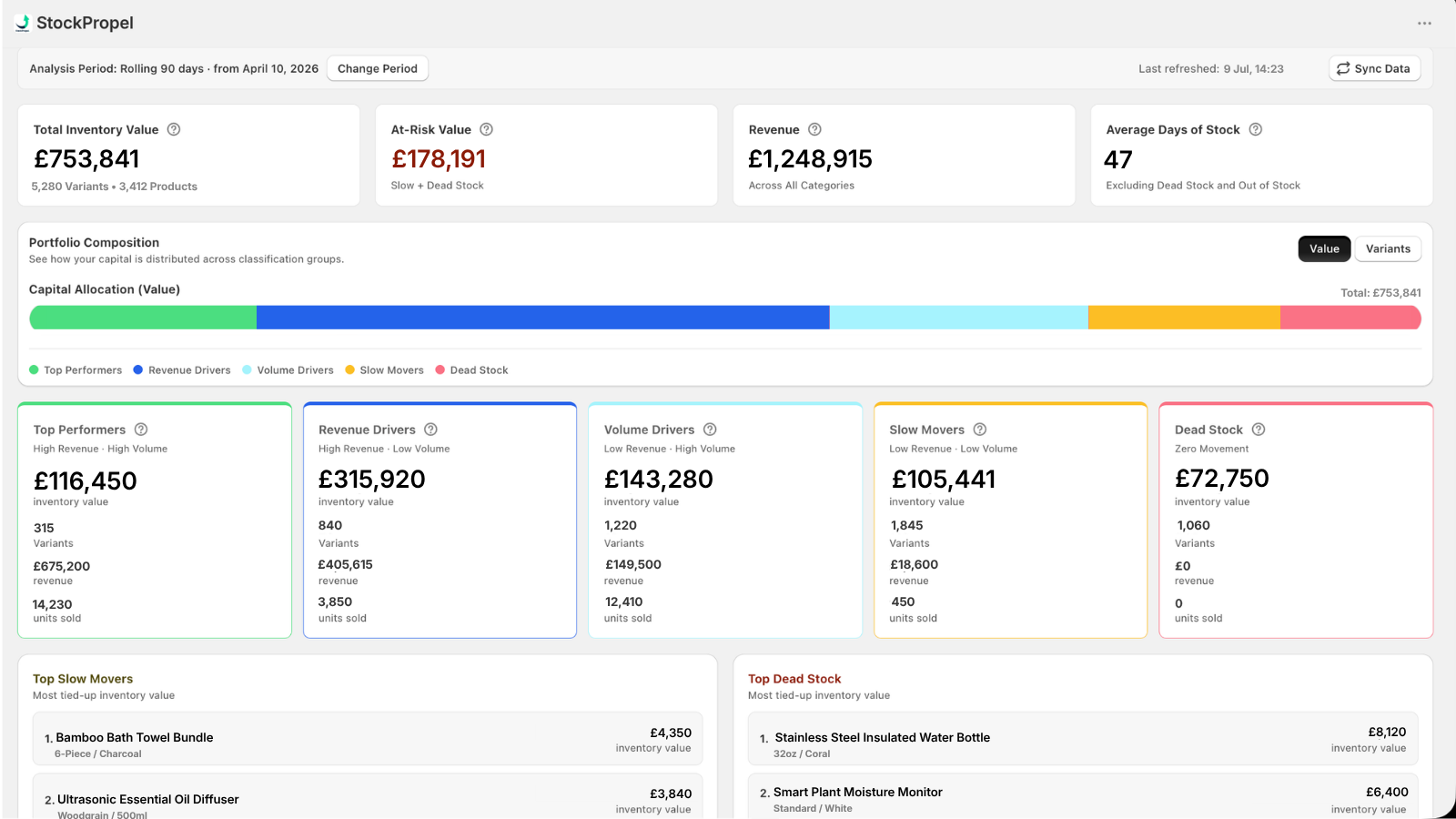
Total inventory value
£753,841
5,280 Variants · 3,412 Products
At-risk value
£178,191
Slow + Dead Stock
Revenue (90 days)
£1,248,915
Across all categories
Avg days of stock
47 days
Excluding Dead Stock
Portfolio composition
Capital allocation (value)
Top Performers Revenue Drivers Volume Drivers Slow Movers Dead Stock
Select a group to see more detail.
Top slow mover by value
Bamboo Bath Towel Bundle
6-Piece / Charcoal
£4,350
Slow Mover
Top dead stock by value
Stainless Steel Insulated Water Bottle
32oz / Coral
£8,120
Dead Stock
StockPropel Overview dashboard

Every variant. Classified, quantified, and ready to act on.

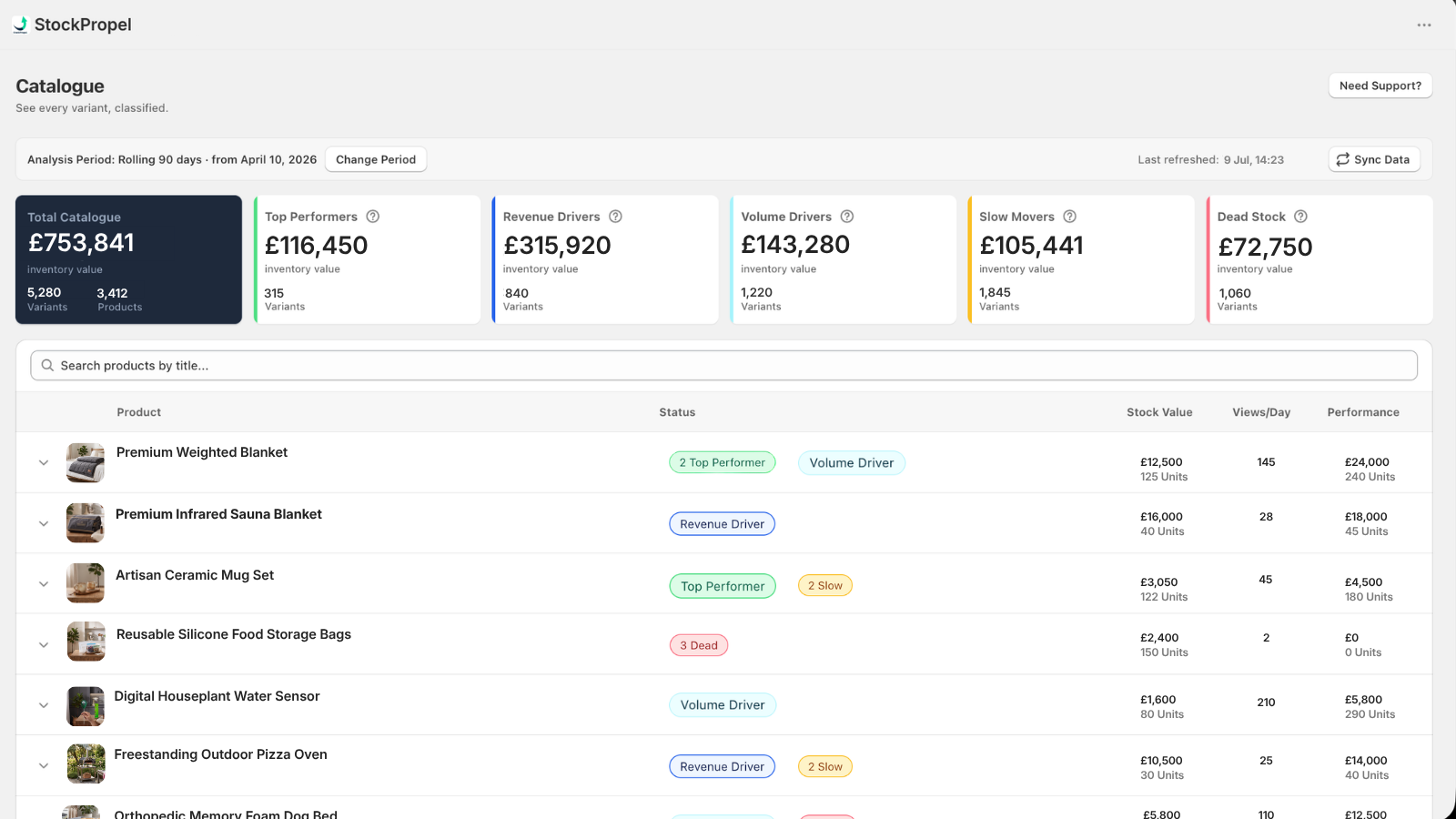
The Catalogue gives you a working view of your entire range — performance tier status, days of stock, units sold, revenue, and views per day for every variant. The Variant Insights panel goes deeper: sales velocity and units sold across three trend periods within your analysis window, gross margin, and the demand vs. visibility read that tells you why a variant is underperforming — not just that it is. The analysis period is fully customisable.

Variant Status Days of stock Revenue
Click Insights on any variant to view its data.
StockPropel Catalogue view

Your performance tier data, readable by your whole stack.

StockPropel writes performance tier results as Shopify variant metafields. This isn't a direct integration — each platform requires its own manual setup. But once configured, your ad spend, email flows, and automations can all reflect the commercial reality of your catalogue.

* Available on the Insights paid plan

Google Merchant Center

Stop spending budget on variants that won't convert. Feed performance tier data into your supplemental feed and your top performers pull spend automatically — while slow movers and dead stock are suppressed entirely.

Klaviyo

Build segments from performance tier data and ensure your campaigns always feature variants worth promoting — not ones sitting at 180 days of stock.

Meta Ads

Build product sets from performance tier data. Your top performers get the spend. Your dead stock doesn't appear in a carousel. Simple structural improvement with a direct impact on performance.

Shopify Sidekick

Performance tier metafields are readable by Sidekick. With manual setup, use them to build collections, rules, and automations that reflect actual catalogue performance.

* Manual setup required in each platform. StockPropel writes the performance tier data to your Shopify metafields — connecting it to your tools is merchant-led. We provide guidance to help you get set up.

Start free. Upgrade when you're ready.

The Overview dashboard is free with no time limit. The Insights plan unlocks your complete Catalogue, variant-level Insights, and the metafield data layer.

Dashboard
$0 / month

The Overview dashboard, free to install. Understand your catalogue's commercial performance before you commit to anything.

  • Five performance tiers on install
  • Total inventory value at a glance
  • At-risk capital across slow and dead stock
  • Portfolio composition bar by value
  • Top 3 slow mover SKUs by inventory value
  • Top 3 dead stock SKUs by inventory value
  • Average days of stock storewide

You're on the list!

Launching soon on the Shopify App Store

FAQs

Once installed, StockPropel connects to your Shopify store via the official API and begins classifying your catalogue. Your Overview is available within minutes. The Insights plan also installs a lightweight storefront tracking pixel to measure product views per day — this is what enables the demand vs. visibility read for each variant.

No. StockPropel is an intelligence layer — it reads your data and surfaces classification insights. On the Insights plan it writes metafields to your variants, but makes no changes to prices, collections, or product visibility. You remain in control of every decision.

StockPropel accesses product, variant, inventory, and order data through Shopify's standard API. It does not access customer lists, theme files, or payment information. Privacy and security are foundational to how the app is built.

StockPropel works best when you have enough variants for classification to be meaningful — broadly, the more complex your catalogue, the more value you'll get. There's no upper limit.

Metafields are structured data fields in Shopify that other tools can read. StockPropel writes your performance tier results to variant metafields automatically. Connecting those metafields to platforms like Google Merchant Center, Klaviyo, or Meta Ads requires manual setup in each platform — it's not a direct integration. We provide guidance to help you configure each one.

No. StockPropel uses Shopify's native Web Pixel extension framework, which means the tracking code runs inside Shopify's own sandboxed worker environment — completely separate from your storefront's main thread. It doesn't inject any script tags into your theme and has no impact on HTML parsing or page paint. The extension itself is 2.1KB (1.1KB compressed). It only fires on product page views — not on every page load — and sends a single lightweight request using the browser's native fetch API with keepalive. Shopify controls when and how the pixel runtime loads; StockPropel's code runs inside that isolated environment. In short: your Lighthouse scores are safe.

StockPropel analyses sales velocity and inventory levels across your catalogue and segments every variant into one of five performance tiers, benchmarked against your own catalogue median — not a fixed external threshold. Performance tiers update automatically on each data sync, so your portfolio view always reflects current performance.

Your catalogue is telling you something. Are you set up to hear it?

StockPropel is launching on the Shopify App Store soon. Get in touch to be notified the moment it goes live.

You're on the list — we'll be in touch the moment we launch.

Launching soon on the Shopify App Store